> For the complete documentation index, see [llms.txt](https://nso-docs.cisco.com/llms.txt). Markdown versions of documentation pages are available by appending `.md` to page URLs; this page is available as [Markdown](https://nso-docs.cisco.com/guides/nso-6.3/administration/installation-and-deployment/deployment-example.md).
# Deployment Example
Understand NSO deployment with an example setup.
This section shows examples of a typical deployment for a highly available (HA) setup. A reference to an example implementation of the `tailf-hcc` layer-2 upgrade deployment scenario described here, check the NSO example set under `examples.ncs/development-guide/high-availability/hcc`. The example covers the following topics:
* Installation of NSO on all nodes in an HA setup
* Initial configuration of NSO on all nodes
* HA failover
* Upgrading NSO on all nodes in the HA cluster
* Upgrading NSO packages on all nodes in the HA cluster
The deployment examples use both the legacy rule-based and recommended HA Raft setup. See [High Availability](/guides/nso-6.3/administration/management/high-availability.md) for HA details. The HA Raft deployment consists of three nodes running NSO and a node managing them, while the rule-based HA deployment uses only two nodes.
Based on the Raft consensus algorithm, the HA Raft version provides the best fault tolerance, performance, and security and is therefore recommended.
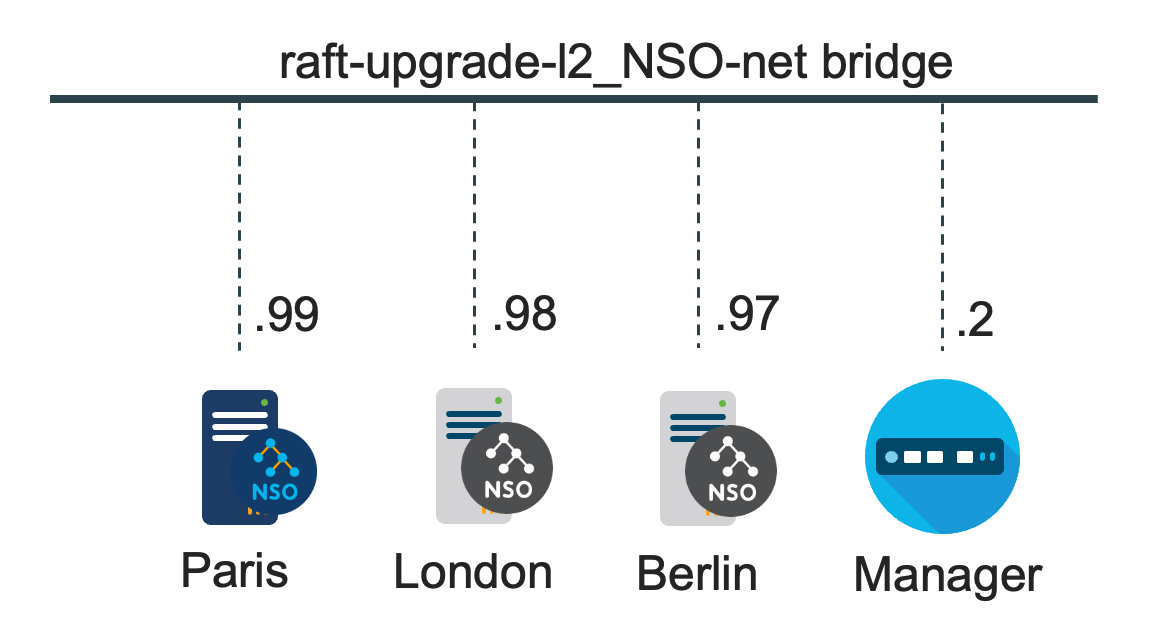
For the HA Raft setup, the NSO nodes `paris.fra`, `london.eng`, and `berlin.ger` nodes make up a cluster of one leader and two followers.
The HA Raft Deployment Network
For the rule-based HA setup, the NSO nodes `paris` and `london` make up one HA pair — one primary and one secondary.
The Rule-Based HA Deployment Network
HA is usually not optional for a deployment. Data resides in CDB, a RAM database with a disk-based journal for persistence. Both HA variants can be set up to avoid the need for manual intervention in a failure scenario, where HA Raft does the best job of keeping the cluster up. See [High Availability](/guides/nso-6.3/administration/management/high-availability.md) for details.
## Initial NSO Installation
An NSO system installation on the NSO nodes is recommended for deployments. For System Installation details, see the [System Install](/guides/nso-6.3/administration/installation-and-deployment/system-install.md) steps.
In this container-based example, Docker Compose uses a `Dockerfile` to build the container image and install NSO on multiple nodes, here containers. A shell script uses an SSH client to access the NSO nodes from the manager node to demonstrate HA failover and, as an alternative, a Python script that implements SSH and RESTCONF clients.
* An `admin` user is created on the NSO nodes. Password-less `sudo` access is set up to enable the `tailf-hcc` server to run the `ip` command. The manager's SSH client uses public key authentication, while the RESTCONF client uses a token to authenticate with the NSO nodes.
The example creates two packages using the `ncs-make-package` command: `dummy` and `inert`. A third package, `tailf-hcc`, provides VIPs that point to the current HA leader/primary node.
* The packages are compressed into a `tar.gz` format for easier distribution, but that is not a requirement.
{% hint style="info" %}
While this deployment example uses containers, it is intended as a generic deployment guide. For details on running NSO in a container, such as Docker, see [Containerized NSO](/guides/nso-6.3/administration/installation-and-deployment/containerized-nso.md).
{% endhint %}
This example uses a minimal Red Hat UBI distribution for hosting NSO with the following added packages:
* NSO's basic dependency requirements are fulfilled by adding the Java Runtime Environment (JRE), OpenSSH, and OpenSSL packages.
* The OpenSSH server is used for shell access and secure copy to the NSO Linux host for NSO version upgrade purposes. The NSO built-in SSH server provides CLI and NETCONF access to NSO.
* The NSO services require Python.
* To fulfill the `tailf-hcc` server dependencies, the `iproute2` utilities and `sudo` packages are installed. See [Dependencies](https://nso-docs.cisco.com/guides/nso-6.3/administration/installation-and-deployment/pages/QSHcYRBwrb34id0mqxMk#ug.ha.hcc.deps) (in the section [Tailf HCC Package](https://nso-docs.cisco.com/guides/nso-6.3/administration/installation-and-deployment/pages/QSHcYRBwrb34id0mqxMk#ug.ha.hcc)) for details on dependencies.
* The `rsyslog` package enables storing an NSO log file from several NSO logs locally and forwarding some logs to the manager.
* The `arp` command from the `net-tools` and `iputils` (`ping`) packages have been added for demonstration purposes.
The steps in the list below are performed as `root`. Docker Compose will build the container images, i.e., create the NSO installation as `root`.
The `admin` user will only need `root` access to run the `ip` command when `tailf-hcc` adds the Layer 2 VIP address to the leader/primary node interface.
The initialization steps are also performed as `root` for the nodes that make up the HA cluster:
* Create the `ncsadmin` and `ncsoper` Linux user groups.
* Create and add the `admin` and `oper` Linux users to their respective groups.
* Perform a system installation of NSO that runs NSO as the `admin` user.
* The `admin` user is granted access to run the **ip** command from the `vipctl` script as `root` using the `sudo` command as required by the `tailf-hcc` package.
* The `cmdwrapper` NSO program gets access to run the scripts executed by the `generate-token` action for generating RESTCONF authentication tokens as the current NSO user.
* Password authentication is set up for the read-only `oper` user for use with NSO only, which is intended for WebUI access.
* The `root` user is set up for Linux shell access only.
* The NSO installer, `tailf-hcc` package, application YANG modules, scripts for generating and authenticating RESTCONF tokens, and scripts for running the demo are all available to the NSO and manager containers.
* `admin` user permissions are set for the NSO directories and files created by the system install, as well as for the `root`, `admin`, and `oper` home directories.
* The `ncs.crypto_keys` are generated and distributed to all nodes.\
\
**Note**: The `ncs.crypto_keys` file is highly sensitive. It contains the encryption keys for all encrypted CDB data, which often includes passwords for various entities, such as login credentials to managed devices.\
\
**Note**: In an NSO System Install setup, not only the TLS certificates (HA Raft) or shared token (rule-based HA) need to match between the HA cluster nodes, but also the configuration for encrypted strings, by default stored in `/etc/ncs/ncs.crypto_keys`, needs to match between the nodes in the HA cluster. For rule-based HA, the tokens configured on the secondary nodes are overwritten with the encrypted token of type `aes-256-cfb-128-encrypted-string` from the primary node when the secondary connects to the primary. If there is a mismatch between the encrypted-string configuration on the nodes, NSO will not decrypt the HA token to match the token presented. As a result, the primary node denies the secondary node access the next time the HA connection needs to be re-established with a "Token mismatch, secondary is not allowed" error.
* For HA Raft, TLS certificates are generated for all nodes.
* The initial NSO configuration, `ncs.conf`, is updated and in sync (identical) on the nodes.
* The SSH servers are configured to allow only SSH public key authentication (no password). The `oper` user can use password authentication with the WebUI but has read-only NSO access.
* The `oper` user is denied access to the Linux shell.
* The `admin` user can access the Linux shell and NSO CLI using public key authentication.
* New keys for all users are distributed to the HA cluster nodes and the manager node when the HA cluster is initialized.
* The OpenSSH server and the NSO built-in SSH server use the same private and public key pairs located under `~/.ssh/id_ed25519`, while the manager public key is stored in the `~/.ssh/authorized_keys` file for both NSO nodes.
* Host keys are generated for all nodes to allow the NSO built-in SSH and OpenSSH servers to authenticate the server to the client.\
\
Each HA cluster node has its own unique SSH host keys stored under `${NCS_CONFIG_DIR}/ssh_host_ed25519_key`. The SSH client(s), here the manager, has the keys for all nodes in the cluster paired with the node's hostname and the VIP address in its `/root/.ssh/known_hosts` file.\
\
The host keys, like those used for client authentication, are generated each time the HA cluster nodes are initialized. The host keys are distributed to the manager and nodes in the HA cluster before the NSO built-in SSH and OpenSSH servers are started on the nodes.
* As NSO runs in containers, the environment variables are set to point to the system install directories in the Docker Compose `.env` file.
* NSO runs as the non-root `admin` user and, therefore, the NSO system installation is done using the `./nso-${VERSION}.linux.${ARCH}.installer.bin --system-install --run-as-user admin --ignore-init-scripts` options. By default, the NSO installation start script will create a `systemd` system service to run NSO as the `admin` user (default is the `root` user) when NSO is started using the `systemctl start ncs` command.\
\
However, this example uses the `--ignore-init-scripts` option to skip installing `systemd` scripts as it runs in a container that does not support `systemd`.\
\
The environment variables are copied to a `.pam_environment` file so the `root` and `admin` users can set the required environment variables when those users access the shell via SSH.\
\
The `/etc/systemd/system/ncs.service` `systemd` service script is installed as part of the NSO system install, if not using the `--ignore-init-scripts` option, and it can be customized if you would like to use it to start NSO. The script may provide what you need and can be a starting point.
* The OpenSSH `sshd` and `rsyslog` daemons are started.
* The packages from the package store are added to the `${NCS_RUN_DIR}/packages` directory before finishing the initialization part in the `root` context.
* The NSO smart licensing token is set.
## The `ncs.conf` Configuration
* The NSO IPC socket is configured in `ncs.conf` to only listen to localhost 127.0.0.1 connections, which is the default setting.\
\
By default, the clients connecting to the NSO IPC socket are considered trusted, i.e., no authentication is required, and the use of 127.0.0.1 with the `/ncs-config/ncs-ipc-address` IP address in `ncs.conf` to prevent remote access. See [Security Considerations](#ug.admin_guide.deployment.security) and [ncs.conf(5)](https://nso-docs.cisco.com/guides/nso-6.3/administration/installation-and-deployment/pages/ofFMge73YTXC5pP75nqa#ncs.conf) in Manual Pages for more details.
* `/ncs-config/aaa/pam` is set to enable PAM to authenticate users as recommended. All remote access to NSO must now be done using the NSO host's privileges. See [ncs.conf(5)](https://nso-docs.cisco.com/guides/nso-6.3/administration/installation-and-deployment/pages/ofFMge73YTXC5pP75nqa#ncs.conf) in Manual Pages for details.
* Depending on your Linux distribution, you may have to change the `/ncs-config/aaa/pam/service` setting. The default value is `common-auth`. Check the file `/etc/pam.d/common-auth` and make sure it fits your needs. See [ncs.conf(5)](https://nso-docs.cisco.com/guides/nso-6.3/administration/installation-and-deployment/pages/ofFMge73YTXC5pP75nqa#ncs.conf) in Manual Pages for details.\
\
Alternatively, or as a complement to the PAM authentication, users can be stored in the NSO CDB database or authenticated externally. See [Authentication](https://nso-docs.cisco.com/guides/nso-6.3/administration/installation-and-deployment/pages/IGGUokPL0FnnsbPnAUuX#ug.aaa.authentication) for details.
* RESTCONF token authentication under `/ncs-config/aaa/external-validation` is enabled using a `token_auth.sh` script that was added earlier together with a `generate_token.sh` script. See [ncs.conf(5)](https://nso-docs.cisco.com/guides/nso-6.3/administration/installation-and-deployment/pages/ofFMge73YTXC5pP75nqa#ncs.conf) in Manual Pages for details.\
\
The scripts allow users to generate a token for RESTCONF authentication through, for example, the NSO CLI and NETCONF interfaces that use SSH authentication or the Web interface.
The token provided to the user is added to a simple YANG list of tokens where the list key is the username.
* The token list is stored in the NSO CDB operational data store and is only accessible from the node's local MAAPI and CDB APIs. See the HA Raft and rule-based HA `upgrade-l2/manager-etc/yang/token.yang` file in the examples.
* The NSO web server HTTPS interface should be enabled under `/ncs-config/webui`, along with `/ncs-config/webui/match-host-name = true` and `/ncs-config/webui/server-name` set to the hostname of the node, following security best practice. See [ncs.conf(5)](https://nso-docs.cisco.com/guides/nso-6.3/administration/installation-and-deployment/pages/ofFMge73YTXC5pP75nqa#ncs.conf) in Manual Pages for details.
**Note**: The SSL certificates that NSO generates are self-signed:
```bash
$ openssl x509 -in /etc/ncs/ssl/cert/host.cert -text -noout
Certificate:
Data:
Version: 1 (0x0)
Serial Number: 2 (0x2)
Signature Algorithm: sha256WithRSAEncryption
Issuer: C=US, ST=California, O=Internet Widgits Pty Ltd, CN=John Smith
Validity
Not Before: Dec 18 11:17:50 2015 GMT
Not After : Dec 15 11:17:50 2025 GMT
Subject: C=US, ST=California, O=Internet Widgits Pty Ltd
Subject Public Key Info:
.......
```
Thus, if this is a production environment and the JSON-RPC and RESTCONF interfaces using the web server are not used solely for internal purposes, the self-signed certificate must be replaced with a properly signed certificate. See [ncs.conf(5)](https://nso-docs.cisco.com/guides/nso-6.3/administration/installation-and-deployment/pages/ofFMge73YTXC5pP75nqa#ncs.conf) in Manual Pages under `/ncs-config/webui/transport/ssl/cert-file` and `/ncs-config/restconf/transport/ssl/certFile` for more details.
* Disable `/ncs-config/webui/cgi` unless needed.
* The NSO SSH CLI login is enabled under `/ncs-config/cli/ssh/enabled`. See [ncs.conf(5)](https://nso-docs.cisco.com/guides/nso-6.3/administration/installation-and-deployment/pages/ofFMge73YTXC5pP75nqa#ncs.conf) in Manual Pages for details.
* The NSO CLI style is set to C-style, and the CLI prompt is modified to include the hostname under `/ncs-config/cli/prompt`. See [ncs.conf(5)](https://nso-docs.cisco.com/guides/nso-6.3/administration/installation-and-deployment/pages/ofFMge73YTXC5pP75nqa#ncs.conf) in Manual Pages for details.
```xml
\u@nso-\H> \u@nso-\H% \u@nso-\H# \u@nso-\H(\m)#
```
* NSO HA Raft is enabled under `/ncs-config/ha-raft`, and the rule-based HA under `/ncs-config/ha`. See [ncs.conf(5)](https://nso-docs.cisco.com/guides/nso-6.3/administration/installation-and-deployment/pages/ofFMge73YTXC5pP75nqa#ncs.conf) in Manual Pages for details.
* Depending on your provisioned applications, you may want to turn `/ncs-config/rollback/enabled` off. Rollbacks do not work well with nano service reactive FASTMAP applications or if maximum transaction performance is a goal. If your application performs classical NSO provisioning, the recommendation is to enable rollbacks. Otherwise not. See [ncs.conf(5)](https://nso-docs.cisco.com/guides/nso-6.3/administration/installation-and-deployment/pages/ofFMge73YTXC5pP75nqa#ncs.conf) in Manual Pages for details.
## The `aaa_init.xml` Configuration
The NSO System Install places an AAA `aaa_init.xml` file in the `$NCS_RUN_DIR/cdb` directory. Compared to a Local Install for development, no users are defined for authentication in the `aaa_init.xml` file, and PAM is enabled for authentication. NACM rules for controlling NSO access are defined in the file for users belonging to a `ncsadmin` user group and read-only access for a `ncsoper` user group. As seen in the previous sections, this example creates Linux `root`, `admin`, and `oper` users, as well as the `ncsadmin` and `ncsoper` Linux user groups.
PAM authenticates the users using SSH public key authentication without a passphrase for NSO CLI and NETCONF login. Password authentication is used for the `oper` user intended for NSO WebUI login and token authentication for RESTCONF login.
Before the NSO daemon is running, and there are no existing CDB files, the default AAA configuration in the `aaa_init.xml` is used. It is restrictive and is used for this demo with only a minor addition to allow the oper user to generate a token for RESTCONF authentication.
The NSO authorization system is group-based; thus, for the rules to apply to a specific user, the user must be a member of the group to which the restrictions apply. PAM performs the authentication, while the NSO NACM rules do the authorization.
* Adding the `admin` user to the `ncsadmin` group and the `oper` user to the limited `ncsoper` group will ensure that the two users get properly authorized with NSO.
* Not adding the `root` user to any group matching the NACM groups results in zero access, as no NACM rule will match, and the default in the `aaa_init.xml` file is to deny all access.
The NSO NACM functionality is based on the [Network Configuration Access Control Model](https://datatracker.ietf.org/doc/html/rfc8341) IETF RFC 8341 with NSO extensions augmented by `tailf-acm.yang`. See [AAA infrastructure](/guides/nso-6.3/administration/management/aaa-infrastructure.md), for more details.
The manager in this example logs into the different NSO hosts using the Linux user login credentials. This scheme has many advantages, mainly because all audit logs on the NSO hosts will show who did what and when. Therefore, the common bad practice of having a shared `admin` Linux user and NSO local user with a shared password is not recommended.
{% hint style="info" %}
The default `aaa_init.xml` file provided with the NSO system installation must not be used as-is in a deployment without reviewing and verifying that every NACM rule in the file matches the desired authorization level.
{% endhint %}
## The High Availability and VIP Configuration
This example sets up one HA cluster using HA Raft or rule-based HA with the `tailf-hcc` server to manage virtual IP addresses. See [NSO Rule-based HA](/guides/nso-6.3/administration/management/high-availability.md) and [Tail-f HCC Package](https://nso-docs.cisco.com/guides/nso-6.3/administration/installation-and-deployment/pages/QSHcYRBwrb34id0mqxMk#ug.ha.hcc) for details.
The NSO HA, together with the `tailf-hcc` package, provides three features:
* All CDB data is replicated from the leader/primary to the follower/secondary nodes.
* If the leader/primary fails, a follower/secondary takes over and starts to act as leader/primary. This is how HA Raft works and how the rule-based HA variant of this example is configured to handle failover automatically.
* At failover, `tailf-hcc` sets up a virtual alias IP address on the leader/primary node only and uses gratuitous ARP packets to update all nodes in the network with the new mapping to the leader/primary node.
Nodes in other networks can be updated using the `tailf-hcc` layer-3 BGP functionality or a load balancer. See the NSO example set under `examples.ncs/development-guide/high-availability`.
See the NSO example set under `examples.ncs/development-guide/high-availability/hcc` for a reference to an HA Raft and rule-based HA `tailf-hcc` Layer 3 BGP examples.
The HA Raft and rule-based HA upgrade-l2 examples also demonstrate HA failover, upgrading the NSO version on all nodes, and upgrading NSO packages on all nodes.
## Global Settings and Timeouts
Depending on your installation, e.g., the size and speed of the managed devices and the characteristics of your service applications, some default values of NSO may have to be tweaked, particularly some of the timeouts.
* Device timeouts. NSO has connect, read, and write timeouts for traffic between NSO and the managed devices. The default value may not be sufficient if devices/nodes are slow to commit, while some are sometimes slow to deliver their full configuration. Adjust timeouts under `/devices/global-settings` accordingly.
* Service code timeouts. Some service applications can sometimes be slow. Adjusting the `/services/global-settings/service-callback-timeout` configuration might be applicable depending on the applications. However, the best practice is to change the timeout per service from the service code using the Java `ServiceContext.setTimeout` function or the Python `data_set_timeout` function.
There are quite a few different global settings for NSO. The two mentioned above often need to be changed.
## Cisco Smart Licensing
NSO uses Cisco Smart Licensing, which is described in detail in [Cisco Smart Licensing](/guides/nso-6.3/administration/management/system-management/cisco-smart-licensing.md). After registering your NSO instance(s), and receiving a token, following steps 1-6 as described in the [Create a License Registration Token](/guides/nso-6.3/administration/management/system-management/cisco-smart-licensing.md#d5e2927) section of Cisco Smart Licensing, enter a token from your Cisco Smart Software Manager account on each host. Use the same token for all instances and script entering the token as part of the initial NSO configuration or from the management node:
```cli
admin@nso-paris# license smart register idtoken YzY2Yj...
admin@nso-london# license smart register idtoken YzY2Yj...
```
{% hint style="info" %}
The Cisco Smart Licensing CLI command is present only in the Cisco Style CLI, which is the default CLI for this setup.
{% endhint %}
## Log Management
### Log Rotate
The NSO system installations performed on the nodes in the HA cluster also install defaults for **logrotate**. Inspect `/etc/logrotate.d/ncs` and ensure that the settings are what you want. Note that the NSO error logs, i.e., the files `/var/log/ncs/ncserr.log*`, are internally rotated by NSO and must not be rotated by `logrotate`.
### Syslog
For the HA Raft and rule-based HA upgrade-l2 examples, see the reference from the `examples.ncs/development-guide/high-availability/hcc/README`; the examples integrate with `rsyslog` to log the `ncs`, `developer`, `upgrade`, `audit`, `netconf`, `snmp`, and `webui-access` logs to syslog with `facility` set to `daemon` in `ncs.conf`.
`rsyslogd` on the nodes in the HA cluster is configured to write the daemon facility logs to `/var/log/daemon.log`, and forward the daemon facility logs with the severity `info` or higher to the manager node's `/var/log/ha-cluster.log` syslog.
### Audit Network Log and NED Traces
Use the audit-network-log for recording southbound traffic towards devices. Enable by setting `/ncs-config/logs/audit-network-log/enabled` and `/ncs-config/logs/audit-network-log/file/enabled` to true in `$NCS_CONFIG_DIR/ncs.conf`, See [ncs.conf(5)](https://nso-docs.cisco.com/guides/nso-6.3/administration/installation-and-deployment/pages/ofFMge73YTXC5pP75nqa#ncs.conf) in Manual Pages for more information.
NED trace logs are a crucial tool for debugging NSO installations and not recommended for deployment. These logs are very verbose and for debugging only. Do not enable these logs in production.
Note that the NED logs include everything, even potentially sensitive data is logged. No filtering is done. The NED trace logs are controlled through the CLI under: `/device/global-settings/trace`. It is also possible to control the NED trace on a per-device basis under `/devices/device[name='x']/trace`.
There are three different settings for trace output. For various historical reasons, the setting that makes the most sense depends on the device type.
* For all CLI NEDs, use the `raw` setting.
* For all ConfD and netsim-based NETCONF devices, use the pretty setting. This is because ConfD sends the NETCONF XML unformatted, while `pretty` means that the XML is formatted.
* For Juniper devices, use the `raw` setting. Juniper devices sometimes send broken XML that cannot be formatted appropriately. However, their XML payload is already indented and formatted.
* For generic NED devices - depending on the level of trace support in the NED itself, use either `pretty` or `raw`.
* For SNMP-based devices, use the `pretty` setting.
Thus, it is usually not good enough to control the NED trace from `/devices/global-settings/trace`.
### Python Logs
While there is a global log for, for example, compilation errors in `/var/log/ncs/ncs-python-vm.log`, logs from user application packages are written to separate files for each package, and the log file naming is `ncs-python-vm-`*`pkg_name`*`.log`. The level of logging from Python code is controlled on a per package basis. See [Debugging of Python packages](/guides/nso-6.3/development/core-concepts/nso-virtual-machines/nso-python-vm.md#debugging-of-python-packages) for more details.
### Java Logs
User application Java logs are written to `/var/log/ncs/ncs-java-vm.log`. The level of logging from Java code is controlled per Java package. See [Logging](/guides/nso-6.3/development/core-concepts/nso-virtual-machines/nso-java-vm.md#logging) in Java VM for more details.
### Internal NSO Log
The internal NSO log resides at `/var/log/ncs/ncserr.*`. The log is written in a binary format. To view the internal error log, run the following command:
```bash
$ ncs --printlog /var/log/ncs/ncserr.log.1
```
## Monitoring the Installation
All large-scale deployments employ monitoring systems. There are plenty of good tools to choose from, open source and commercial. All good monitoring tools can script (using various protocols) what should be monitored. It is recommended that a special read-only Linux user without shell access be set up like the `oper` user earlier in this chapter. A few commonly used checks include:
* At startup, check that NSO has been started using the `$NCS_DIR/bin/ncs_cmd -c "wait-start 2"` command.
* Use the `ssh` command to verify SSH access to the NSO host and NSO CLI.
* Check disk usage using, for example, the `df` utility.
* For example, use **curl** or the Python requests library to verify that the RESTCONF API is accessible.
* Check that the NETCONF API is accessible using, for example, the `$NCS_DIR/bin/netconf-console` tool with a `hello` message.
* Verify the NSO version using, for example, the `$NCS_DIR/bin/ncs --version` or RESTCONF `/restconf/data/tailf-ncs-monitoring:ncs-state/version`.
* Check if HA is enabled using, for example, RESTCONF `/restconf/data/tailf-ncs-monitoring:ncs-state/ha`.
### Alarms
RESTCONF can be used to view the NSO alarm table and subscribe to alarm notifications. NSO alarms are not events. Whenever an NSO alarm is created, a RESTCONF notification and SNMP trap are also sent, assuming that you have a RESTCONF client registered with the alarm stream or configured a proper SNMP target. Some alarms, like the rule-based HA `ha-secondary-down` alarm, require the intervention of an operator. Thus, a monitoring tool should also fetch the NSO alarm list.
```bash
$ curl -ik -H "X-Auth-Token: TsZTNwJZoYWBYhOPuOaMC6l41CyX1+oDaasYqQZqqok=" \
https://paris:8888/restconf/data/tailf-ncs-alarms:alarms
```
Or subscribe to the `ncs-alarms` RESTCONF notification stream.
### Metric - Counters, Gauges, and Rate of Change Gauges
NSO metric has different contexts all containing different counters, gauges, and rate of change gauges. There is a `sysadmin`, a `developer` and a `debug` context. Note that only the `sysadmin` context is enabled by default, as it is designed to be lightweight. Consult the YANG module `tailf-ncs-metric.yang` to learn the details of the different contexts.
### **Counters**
You may read counters by e.g. CLI, as in this example:
```cli
admin@ncs# show metric sysadmin counter session cli-total
metric sysadmin counter session cli-total 1
```
### **Gauges**
You may read gauges by e.g. CLI, as in this example:
```cli
admin@ncs# show metric sysadmin gauge session cli-open
metric sysadmin gauge session cli-open 1
```
### **Rate of Change Gauges**
You may read rate of change gauges by e.g. CLI, as in this example:
```cli
admin@ncs# show metric sysadmin gauge-rate session cli-open
NAME RATE
-------------
1m 0.0
5m 0.2
15m 0.066
```
## Security Considerations
The presented configuration enables the built-in web server for the WebUI and RESTCONF interfaces. It is paramount for security that you only enable HTTPS access with `/ncs-config/webui/match-host-name` and `/ncs-config/webui/server-name` properly set.
The AAA setup described so far in this deployment document is the recommended AAA setup. To reiterate:
* Have all users that need access to NSO authenticated through Linux PAM. This may then be through `/etc/passwd`. Avoid storing users in CDB.
* Given the default NACM authorization rules, you should have three different types of users on the system.
* Users with shell access are members of the `ncsadmin` Linux group and are considered fully trusted because they have full access to the system.
* Users without shell access who are members of the `ncsadmin` Linux group have full access to the network. They have access to the NSO SSH shell and can execute RESTCONF calls, access the NSO CLI, make configuration changes, etc. However, they cannot manipulate backups or perform system upgrades unless such actions are added to by NSO applications.
* Users without shell access who are members of the `ncsoper` Linux group have read-only access. They can access the NSO SSH shell, read data using RESTCONF calls, etc. However, they cannot change the configuration, manipulate backups, and perform system upgrades.
If you have more fine-grained authorization requirements than read-write and read-only, additional Linux groups can be created, and the NACM rules can be updated accordingly. See [The `aaa_init.xml` Configuration](#ug.admin_guide.deployment.aaa) from earlier in this chapter on how the reference example implements users, groups, and NACM rules to achieve the above.
The default `aaa_init.xml` file must not be used as-is before reviewing and verifying that every NACM rule in the file matches the desired authorization level.
For a detailed discussion of the configuration of authorization rules through NACM, see [AAA infrastructure](/guides/nso-6.3/administration/management/aaa-infrastructure.md), particularly the section [Authorization](https://nso-docs.cisco.com/guides/nso-6.3/administration/installation-and-deployment/pages/IGGUokPL0FnnsbPnAUuX#ug.aaa.authorization).
A considerably more complex scenario is when users require shell access to the host but are either untrusted or should not have any access to NSO at all. NSO listens to a so-called IPC socket configured through `/ncs-config/ncs-ipc-address`. This socket is typically limited to local connections and defaults to `127.0.0.1:4569` for security. The socket multiplexes several different access methods to NSO.
The main security-related point is that no AAA checks are performed on this socket. If you have access to the socket, you also have complete access to all of NSO.
To drive this point home, when you invoke the `ncs_cli` command, a small C program that connects to the socket and tells NSO who you are, NSO assumes that authentication has already been performed. There is even a documented flag `--noaaa`, which tells NSO to skip all NACM rule checks for this session.
You must protect the socket to prevent untrusted Linux shell users from accessing the NSO instance using this method. This is done by using a file in the Linux file system. The file `/etc/ncs/ipc_access` gets created and populated with random data at install time. Enable `/ncs-config/ncs-ipc-access-check/enabled` in `ncs.conf` and ensure that trusted users can read the `/etc/ncs/ipc_access` file, for example, by changing group access to the file. See [ncs.conf(5)](https://nso-docs.cisco.com/guides/nso-6.3/administration/installation-and-deployment/pages/ofFMge73YTXC5pP75nqa#ncs.conf) in Manual Pages for details.
```bash
$ cat /etc/ncs/ipc_access
cat: /etc/ncs/ipc_access: Permission denied
$ sudo chown root:ncsadmin /etc/ncs/ipc_access
$ sudo chmod g+r /etc/ncs/ipc_access
$ ls -lat /etc/ncs/ipc_access
$ cat /etc/ncs/ipc_access
.......
```
For an HA setup, HA Raft is based on the Raft consensus algorithm and provides the best fault tolerance, performance, and security. It is therefore recommended over the legacy rule-based HA variant. The `raft-upgrade-l2` project, referenced from the NSO example (set under `examples.ncs/development-guide/high-availability/hcc`) together with this Deployment Example section, describes a reference implementation. See [NSO HA Raft](https://nso-docs.cisco.com/guides/nso-6.3/administration/installation-and-deployment/pages/QSHcYRBwrb34id0mqxMk#ug.ha.raft) for more HA Raft details.
---
# Agent Instructions
This documentation is published with GitBook. GitBook is the documentation platform designed so that both humans and AI agents can read, navigate, and reason over technical content effectively. Learn more at gitbook.com.
## Querying This Documentation
If you need additional information that is not directly available in this page, you can query the documentation by asking a question.
Perform an HTTP GET request on the following URL with the `ask` and `goal` query parameters:
```
GET https://nso-docs.cisco.com/guides/nso-6.3/administration/installation-and-deployment/deployment-example.md?ask=&goal=
```
`ask` is the immediate question: it should be specific, self-contained, and written in natural language.
`goal` is what the user is ultimately trying to achieve, the reason they need the answer. Sharing it helps GitBook give you a better, more relevant answer. A goal is most helpful when it describes the outcome the user wants rather than restating the question. For example, with `ask=how do I create an API token`, a goal like `automate deployments from our CI pipeline` lets GitBook tailor the answer to that use case.
The response will contain a direct answer to the question and relevant excerpts and sources from the documentation.
Use this mechanism when the answer is not explicitly present in the current page, you need clarification or additional context, or you want to retrieve related documentation sections.